Dropped Your Phone in Water? What to Do in the First Hour (and Why Rice Doesn't Help)
What you do in the first hour matters more than anything a repair shop does later. Here's the step-by-step, what to avoid, and how to tell if the damage is hidden.

Quick answer
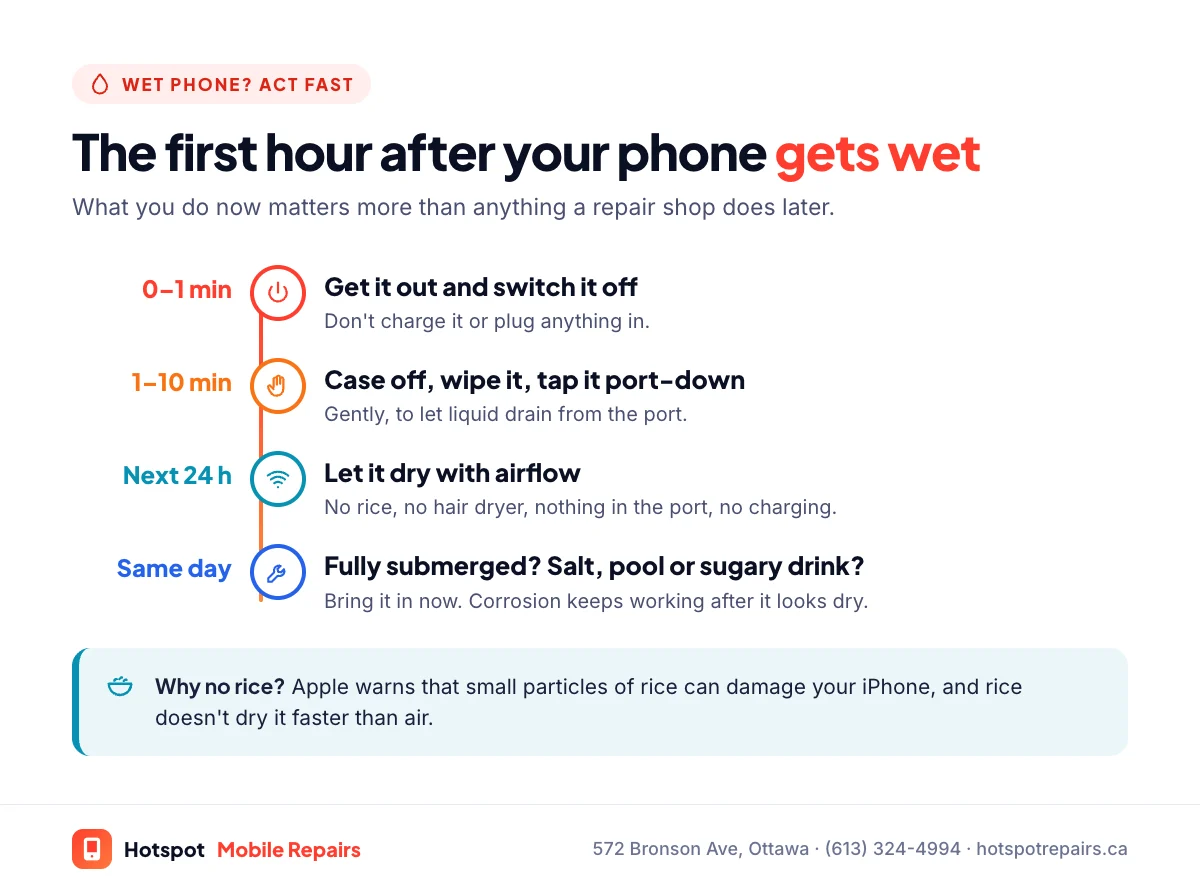
Get it out, switch it off and don't charge it. Wipe it dry, take off the case, tap it gently with the charging port facing down, and leave it somewhere dry with some airflow. Don't use rice (Apple warns rice particles can damage your iPhone) and don't use a hair dryer. If it went fully under, or into salt water, a pool or a sugary drink, bring it in as soon as you can: corrosion keeps working even after the phone looks dry. At Hotspot Mobile Repairs, water damage is a free diagnostic and no fix, no fee.
- Switch it off and don't charge it until it's completely dry.
- No rice and no heat. Apple advises against both.
- Water-resistance ratings are lab tests in fresh water, and they wear off over time.
- Salt water, pool water and sugary drinks corrode fastest. Get those checked quickly.
Sink, toilet, pool, puddle, a latte on the desk: water damage is one of the most common repairs we see at our Bronson Avenue shop. The good news is that many wet phones can be saved. What you do in the first hour makes the biggest difference.
The first 10 minutes
- Get it out fast. Every second underwater lets more liquid past the seals.
- Switch it off and leave it off. Electricity plus water is what causes most of the damage.
- Don't charge it, and don't plug in headphones or accessories.
- Take the case off so the phone can dry.
- Wipe the outside dry with a lint-free cloth.
- Tap it gently against your hand with the charging port facing down to let liquid drain, as Apple suggests.
- Leave it somewhere dry with some airflow.
What not to do
- No rice. Apple says it plainly: "Don't put your iPhone in a bag of rice. Doing so could allow small particles of rice to damage your iPhone." Rice doesn't dry a sealed phone faster than air, and its dust can end up in the port.
- No heat. Apple also says not to dry an iPhone "using an external heat source or compressed air." Hair dryers and radiators can damage the battery and push water deeper.
- Nothing in the port. Don't push cotton swabs or paper towels into the charging port.
- Don't keep pressing buttons to see if it works. Each try powers up a wet circuit.
How long to wait
If your iPhone shows a liquid-detection alert after a splash, Apple advises waiting at least 30 minutes before trying to charge, and notes it can take up to 24 hours to dry fully. That's for a splash in the port. If the phone went fully under, especially in anything other than clean water, don't wait a day to see what happens. Bring it in.
"But my phone is water-resistant"
Most recent phones have an IP68 rating: iPhone 12 and later are rated to a maximum depth of 6 metres for up to 30 minutes, and Samsung rates recent Galaxy S phones for up to 1.5 metres of fresh water for 30 minutes. But these are lab tests in still, fresh water, and both companies say resistance isn't permanent. Apple notes it "might decrease as a result of normal wear" and that liquid damage isn't covered under warranty. A cracked screen or cracked back glass breaks the seal entirely.
Which liquids are worst
| Liquid | Risk | Why |
|---|---|---|
| Salt water (ocean) or salty slush | Very high | Salt is highly corrosive to circuit boards |
| Pool or hot tub | High | Chlorine and chemicals corrode contacts |
| Pop, juice, sweetened coffee | High | Sticky sugar residue traps moisture and corrodes |
| Toilet | Medium to high | Fresh-ish water, but a hygiene problem too |
| Clean tap water | Lower | Still conducts electricity; still dry it properly |
Signs of hidden water damage
Some phones seem fine for days, then fail as corrosion spreads. Watch for fog inside the camera lens, muffled speakers, a repeated liquid alert, spots or lines on the screen, charging problems (see why your phone won't charge) or random restarts. If the phone won't come on at all, start with our no-power checklist.
What we do with a water-damaged phone
We open the phone, inspect the board for liquid and corrosion, clean it in an ultrasonic bath, dry it properly and replace anything the liquid destroyed, often the charging port, screen or battery. Diagnostics are free, and water damage repairs are no fix, no fee. If the photos matter more than the phone, tell us: data recovery may be possible even when the phone isn't worth repairing.
Protect yourself for next time
Turn on automatic backups today; it takes five minutes with our backup checklist. And if it's your laptop that took the spill, read what to do after spilling on a MacBook.
Frequently asked questions
Does putting a wet phone in rice work?
No. Apple specifically says not to put an iPhone in a bag of rice, because small particles of rice can damage it. Rice doesn't pull water out of a sealed phone any faster than dry air does.
How long should I wait before charging a phone that got wet?
For a liquid-detection alert, Apple says to wait at least 30 minutes before trying to charge, and that it can take up to 24 hours to dry fully. If the phone was fully submerged, don't charge it at all until it's been checked.
My phone is water-resistant. Why did it get damaged?
Ratings like IP68 come from lab tests in still, fresh water, and seals wear with age and knocks. Apple says water resistance isn't permanent and can decrease with normal wear. A cracked screen or back breaks the seal completely.
Is water damage covered by warranty?
Not by Apple's standard warranty, which says liquid damage isn't covered. AppleCare+ covers accidental damage for a fee ($129 for other accidental damage on iPhone in Canada).
How much does a water damage repair cost?
It depends on what the liquid damaged, so we quote after a free diagnostic. Water damage repairs at Hotspot are no fix, no fee.
Sources & further reading
- If you see a liquid-detection alert on your iPhone — Apple Support (Canada)
- About splash, water, and dust resistance of iPhone 7 and later — Apple Support (Canada)
- Samsung Galaxy S26 Ultra (water and dust resistance) — Samsung Canada
- AppleCare — Apple (Canada)
Prices and details were checked on September 27, 2026. They can change; call us for today's price.