How to Back Up Your iPhone or Android Before a Repair (5-Minute Checklist)
Screen and battery repairs don't erase your phone, but a fresh backup costs nothing. Here's the quickest way to do it on iPhone and Android, plus a drop-off checklist.

Quick answer
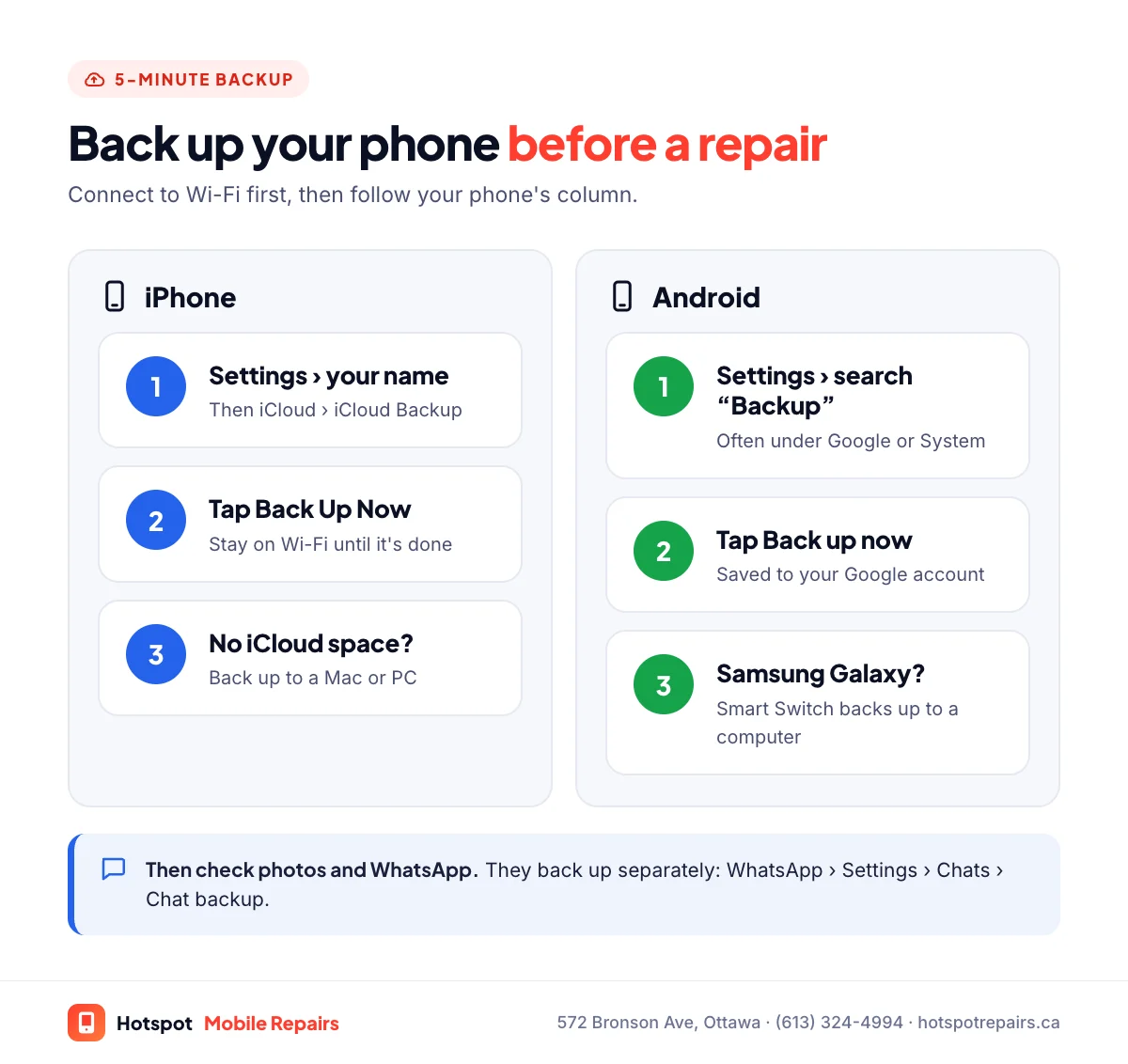
On an iPhone, go to Settings › [your name] › iCloud › iCloud Backup and tap Back Up Now on Wi-Fi, or back up to a computer. On Android, open Settings and search for “Backup” (the path varies by phone), or use Samsung Smart Switch on a Galaxy. Then check that your photos and WhatsApp chats are backed up too, since they use their own settings. Most repairs, like screens and batteries, don't erase your phone, but a fresh backup is cheap insurance.
- iPhone: iCloud Backup › Back Up Now, or a computer backup (Finder, or the Apple Devices app on Windows).
- Android: search “Backup” in Settings; Galaxy owners can also use Samsung Smart Switch.
- Photos and chat apps like WhatsApp have their own backups. Check them.
- Make sure you can get two-factor codes without this phone before you drop it off.
Most repairs never touch your data. Still, your phone holds years of photos and the codes you need to log in to everything, and a backup takes five minutes. Do it before any repair, whether with us or anyone else.
iPhone: back up in 3 steps
- Connect to Wi-Fi and plug in your iPhone.
- Go to Settings › [your name] › iCloud › iCloud Backup.
- Tap Back Up Now and wait until it finishes. The screen shows the time of your last successful backup.
No room in iCloud? Back up to a computer instead: on a Mac use Finder, and on Windows use the Apple Devices app or iTunes. Apple's backup guide covers both, and its backup methods page explains the difference.
Android: back up in 3 steps
- Connect to Wi-Fi.
- Open Settings and search for Backup. The path varies by phone; on many it's under Google or System.
- Tap Back up now. Google's Android backup help page has the details.
On a Samsung Galaxy you can also use Samsung Smart Switch to back up everything to a PC or Mac.
Don't forget photos and chats
- Photos: if you use iCloud Photos or Google Photos, check that syncing is finished. Open the app and look for an "up to date" or "backup complete" message.
- WhatsApp: chats are backed up separately, to iCloud on iPhone or Google Drive on Android. Go to WhatsApp › Settings › Chats › Chat backup and tap Back Up.
- Other messaging and authenticator apps may have their own backup or export settings. Check the ones you rely on.
Your drop-off checklist
- Backup done (and photos and chats checked).
- Two-factor codes: make sure you can log in to your bank and email without this phone for an hour, using backup codes or another device.
- Know your passcode. You don't have to share it, but you'll want to unlock the phone to test it after the repair.
- Never share your Apple ID or Google password. No repair needs it.
- Find My: Apple asks you to turn it off before sending a device to Apple. For most repairs at our shop you don't need to, and we'll tell you if yours does. Apple's Activation Lock page explains what it protects.
- Case off, and tell us everything that's wrong so we can fix it in one visit.
Too broken to back up?
If the screen is black or the phone won't stay on, bring it in as it is. We can often repair it enough to run a backup first, or recover the data if it won't turn on at all; see how phone data recovery works. Choosing a shop? Our 10 questions to ask include how your data is handled. Wet phone? Follow our water damage steps first.
Frequently asked questions
Will a phone repair erase my data?
Screen, battery, charging port, camera and speaker repairs don't erase your phone. Back up anyway, because no repair is completely risk-free, and a phone with water or board damage can fail at any time.
How long does an iCloud backup take?
It depends on how much has changed since your last backup and your Wi-Fi speed. A first backup can take a while; later ones are usually quick. Plug in and stay on Wi-Fi until it finishes.
Do I need to turn off Find My before a repair?
Apple asks you to before sending a device to Apple. For most repairs at our shop you don't need to, and we'll tell you if yours does. Never share your Apple ID password with anyone.
Is WhatsApp backed up with my iCloud or Google backup?
WhatsApp chats use WhatsApp's own backup, saved to iCloud on iPhone or Google Drive on Android. Check it in WhatsApp under Settings › Chats › Chat backup.
What if my phone is too broken to back up?
Bring it in. We can often repair it enough to run a backup first, or recover the data if it won't turn on.
Sources & further reading
- How to back up your iPhone, iPad, and iPod touch — Apple Support (Canada)
- Backup methods for iPhone or iPad — Apple Support (Canada)
- Back up or restore data on your Android device — Android Help
- Samsung Smart Switch — Samsung Canada
- Activation Lock for iPhone and iPad — Apple Support (Canada)
Prices and details were checked on September 27, 2026. They can change; call us for today's price.