Can You Recover Data From a Dead or Broken Phone? Data Recovery in Ottawa Explained
Modern phones encrypt everything, which changes how data recovery works. Here's what's usually possible, what isn't, and how not to make things worse before you get help.

Quick answer
Often, yes. Modern iPhones and Android phones encrypt their storage with keys tied to the phone's own main board, so data can't simply be copied off the memory chip. Recovery works by repairing the original phone just enough to start it, whether that means the screen, battery, charging circuit or damaged board components, and then backing everything up. You'll need your passcode. At Hotspot Mobile Repairs, data recovery is quoted after a free inspection.
- Modern phones are encrypted, so recovery means getting the original board working again.
- Many “dead” phones only need a screen, battery or charging repair to get the data back.
- You'll need your passcode. No legitimate shop can bypass it.
- Don't restore, reset or keep charging a wet phone before recovery.
For most people, a dead phone isn't really about the phone. It's about the photos, the contacts and the chats that were never backed up. The good news: a phone that won't turn on isn't the same as lost data. Here's how recovery works today, and what you can do to improve the odds.
Why phone data recovery is different now
On a computer, you can often pull the drive out and read it elsewhere. Modern phones don't work that way. iPhones and current Android phones encrypt their storage, and the keys live in secure hardware on the phone's own main board. The memory chip on its own is unreadable.
So data recovery on a modern phone means one thing: getting the original phone working well enough to start up, unlocking it with your passcode, and copying your data off. Sometimes that's as simple as a new screen. Sometimes it's micro-soldering on the board.
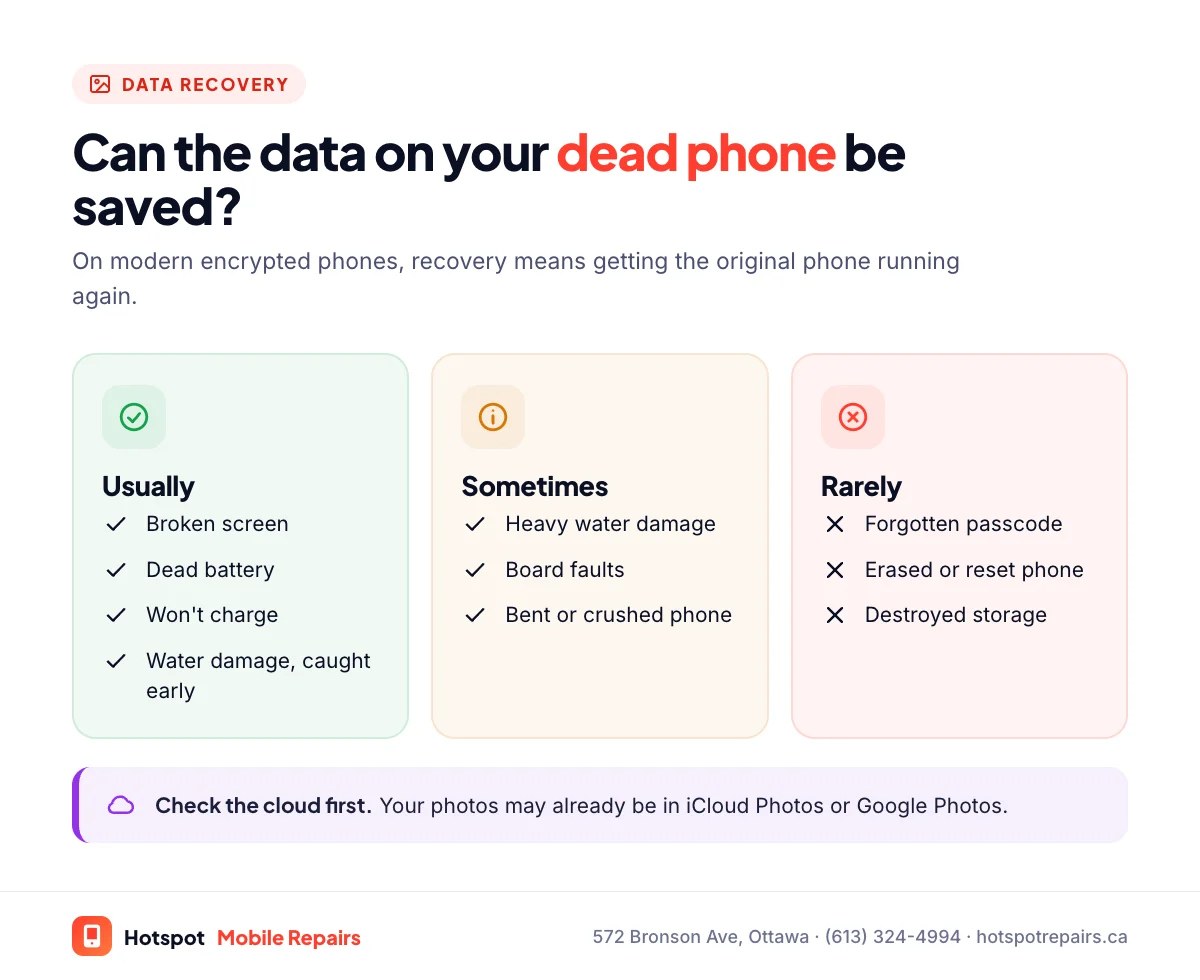
What's usually recoverable
- Broken screen, phone still running: a screen replacement restores full access, with your data untouched. See our screen repair guide.
- Won't charge or dead battery: a new battery or charging port brings it back.
- Water damage caught early: cleaning and repairing the board often gets it running long enough to back up.
- Board faults after a drop: often repairable at component level.
What usually isn't
- A forgotten passcode. Without it the data stays encrypted, and Apple's official route, resetting the iPhone with a computer, erases it. We don't bypass passcodes or activation locks.
- A phone that has been erased or factory reset.
- Storage that's physically destroyed, for example by a crushed or burned board.
Before you do anything else
- Check whether it's already backed up. Sign in at icloud.com or photos.google.com on another device. Your photos may already be safe.
- Don't restore or reset the phone. Choosing "Restore" in recovery mode erases it.
- If it's wet, switch it off and don't charge it. Follow our water damage steps, then bring it in.
- Try the basics in our phone won't turn on checklist. It may just be flat.
- Find your passcode. You'll need it to unlock the phone once it's running.
How recovery works at Hotspot
We inspect the phone for free, tell you what's wrong and what we think can be recovered, and give you a quote before starting. Once the phone runs, you unlock it and we copy your data to your computer, your cloud account or a new phone. Your data is handled confidentially and only used to complete the job.
Never again: set up automatic backups
Once your data is back, turn on backups: iCloud Backup on iPhone, Google backup on Android, or Samsung Smart Switch to a computer. Our 5-minute backup checklist walks you through it. If the phone itself isn't worth repairing after the recovery, our guide to repairing vs. replacing can help you decide.
Frequently asked questions
Can you recover photos from a phone with a broken screen?
Usually, yes. If the phone still runs behind the broken screen, replacing the screen gives you full access again, and your data is untouched. Check first whether your photos are already in iCloud Photos or Google Photos.
Can data be recovered from a water-damaged phone?
Often, if the phone is cleaned before corrosion spreads. Switch it off, don't charge it, and bring it in quickly. The longer it sits, the harder recovery gets.
Can you unlock my phone if I forgot the passcode?
No. Without the passcode, the only official option is to erase the phone, and Apple's own reset process erases it. We don't bypass passcodes or activation locks.
How much does phone data recovery cost?
It depends on what's wrong with the phone, from a simple screen or battery repair to board-level work. We inspect it for free and give you a quote before starting.
Is my data kept private?
Yes. Your phone and data are handled confidentially and used only to complete the recovery and hand everything back to you.
Sources & further reading
- Use a computer to reset your iPhone and your passcode — Apple Support (Canada)
- Backup methods for iPhone or iPad — Apple Support (Canada)
- Back up or restore data on your Android device — Android Help
- Samsung Smart Switch — Samsung Canada
Prices and details were checked on September 27, 2026. They can change; call us for today's price.