iPhone Battery Replacement in Ottawa: Signs You Need One, Cost & Timing
How to read your iPhone's Battery Health screen, what Apple says about charge cycles, what a new battery costs in Canada, and how long the swap takes.

Quick answer
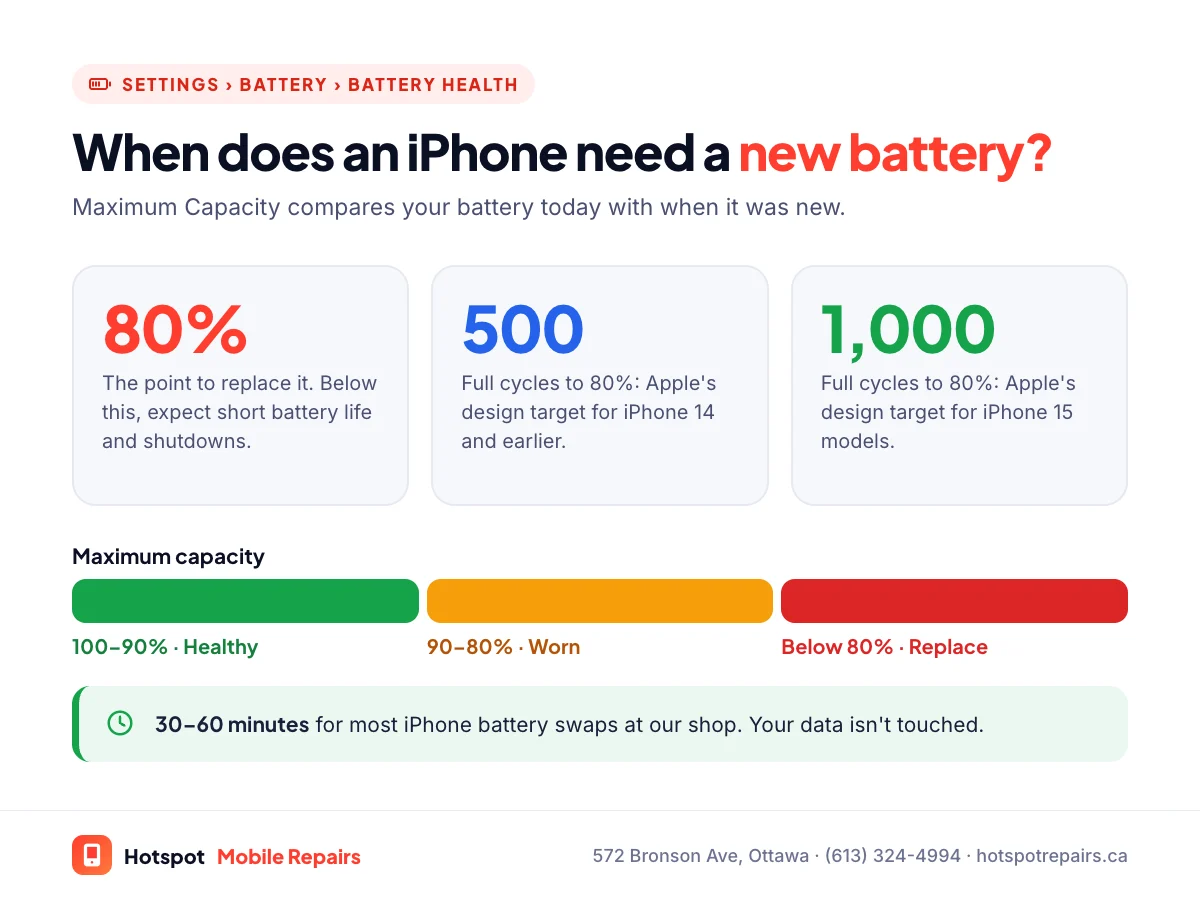
Replace your iPhone battery when Settings › Battery › Battery Health shows below 80% maximum capacity, or sooner if the phone shuts down unexpectedly, slows down or can't make it through the day. Apple charges $95 to $179 before tax for battery service in Canada, depending on the model ($0 with AppleCare+ when eligible). At Hotspot Mobile Repairs on Bronson Avenue, most iPhone batteries are replaced in 30 to 60 minutes.
- Check Settings › Battery › Battery Health & Charging for your maximum capacity.
- Apple designs iPhone 14 and earlier batteries to keep 80% capacity at 500 full cycles, and iPhone 15 models at 1,000.
- Apple's Canadian battery prices run from $95 (iPhone SE) to $179 (iPhone 18 Pro), before tax.
- A battery replacement doesn't erase your phone and usually takes under an hour.
Phone batteries wear out. It's chemistry, not a defect: every charge cycle leaves a little less capacity behind. The question isn't whether your iPhone battery will need replacing, but when. Here's how to tell, what it costs in Canada, and what to expect from the repair.
5 signs your iPhone needs a new battery
- Battery Health is below 80%. Go to Settings › Battery › Battery Health & Charging and look at Maximum Capacity.
- It shuts down unexpectedly, often at 20% or 30%, or as soon as you step outside in winter.
- It feels slower than it used to. After an unexpected shutdown, iOS can manage performance to prevent it happening again, and Apple's battery and performance page explains how.
- It can't make it through a normal day, even with the same habits as before.
- The screen or back is lifting. That's a swollen battery. Stop charging and read our swollen battery guide right away.
How iPhone battery health works
Maximum Capacity compares your battery's capacity today with when it was new. Apple states that batteries in iPhone 14 models and earlier "are designed to retain 80 percent of their original capacity at 500 complete charge cycles under ideal conditions," and batteries in iPhone 15 models at 1,000 complete charge cycles. A complete cycle is 100% worth of charging, even if it's spread over several days. On iPhone 15 models and later you can also see the cycle count in Settings.
What Apple charges for a battery in Canada
From Apple's Canadian battery service page, as of September 27, 2026, before tax:
| iPhone model | Apple battery service |
|---|---|
| iPhone 18 Pro · 18 Pro Max | $179 |
| iPhone 17 Pro · 17 Pro Max · iPhone Air · 16 Pro · 16 Pro Max | $165 |
| iPhone 17 · 17e · 16 · 16 Plus · 16e · every iPhone 15 and 14 model | $135 |
| Every iPhone 13, 12 and 11 model · iPhone XR | $119 |
| iPhone SE (2nd and 3rd generation) | $95 |
With AppleCare+, eligible battery service is $0. Independent shops set their own prices; ask which grade of battery you're getting. Non-genuine batteries appear as an Unknown Part in Settings, which our Parts and Service History guide explains.
What happens during a battery replacement
At our shop the repair usually takes 30 to 60 minutes. We open the phone, disconnect and remove the old battery, fit the new one, reseal the phone and test charging and battery readings with you. Your data isn't touched. Afterwards, use the phone normally; there's no special "calibration" routine needed. Wondering what else can be done while you wait? See same-day repairs in Ottawa.
How to make your new battery last
- Avoid heat. Apple warns that using a device in very hot conditions "can permanently shorten battery life." Don't leave it on a car dashboard or charge it under a pillow; Health Canada advises charging away from soft surfaces like a couch or bed.
- Use the charging limits. Optimized Battery Charging, and the 80% limit on newer models, reduce time spent at 100%.
- Use a certified charger. Health Canada recommends chargers with a recognized Canadian certification mark such as CSA, cUL or cETL.
- Mind the cold. Ottawa winters temporarily sap batteries; our cold-weather guide explains why and what to do.
Battery or charging port?
If your iPhone won't charge at all, the battery might not be the problem. A lint-packed charging port is more common than you'd think. Try our 7 fixes for a phone that won't charge first. Comparing Apple with a local shop? Our side-by-side comparison covers price, speed and parts.
Frequently asked questions
How much does an iPhone battery replacement cost in Ottawa?
Apple's out-of-warranty battery service in Canada costs $95 to $179 before tax, depending on the model: for example $119 for an iPhone 13 and $135 for an iPhone 15. At Hotspot we quote by model; text yours to (613) 324-4994.
How long does an iPhone battery replacement take?
Usually 30 to 60 minutes at our shop, while you wait.
Will I lose my data when the battery is replaced?
No. A battery replacement doesn't erase your iPhone. Backing up first is still a good habit before any repair.
Is it worth replacing the battery on an older iPhone?
Usually, yes, if the phone still gets software updates. A new battery often fixes short battery life, random shutdowns and sluggishness in one go, for a fraction of the cost of a new phone.
Why does my iPhone die in the cold even though the battery seems fine?
Cold temporarily reduces how much power a battery can deliver, and a worn battery is hit hardest. Apple says battery life returns to normal once the phone warms up. If it happens a lot, check your battery health.
Sources & further reading
- iPhone battery and performance — Apple Support (Canada)
- Apple Service and Repair for iPhone Battery — Apple Support (Canada)
- If your iPhone or iPad gets too hot or too cold — Apple Support (Canada)
- Battery safety: Lithium-ion batteries — Health Canada
Prices and details were checked on September 27, 2026. They can change; call us for today's price.