Swollen Phone Battery: Warning Signs, What to Do Now & Safe Disposal in Ottawa
A swelling battery is the one phone problem you shouldn't put off. Here's how to recognise it, what to do in the next ten minutes, and how to get rid of the old battery safely.

Quick answer
If your phone's screen is lifting, the back is bulging or the phone rocks on a flat table, the lithium-ion battery is probably swollen. Stop charging it, don't press on it or try to open it, keep it away from anything flammable, and get the battery replaced as soon as possible. Health Canada says not to use batteries that are swollen or damaged, and batteries are hazardous waste, so never put one in the garbage.
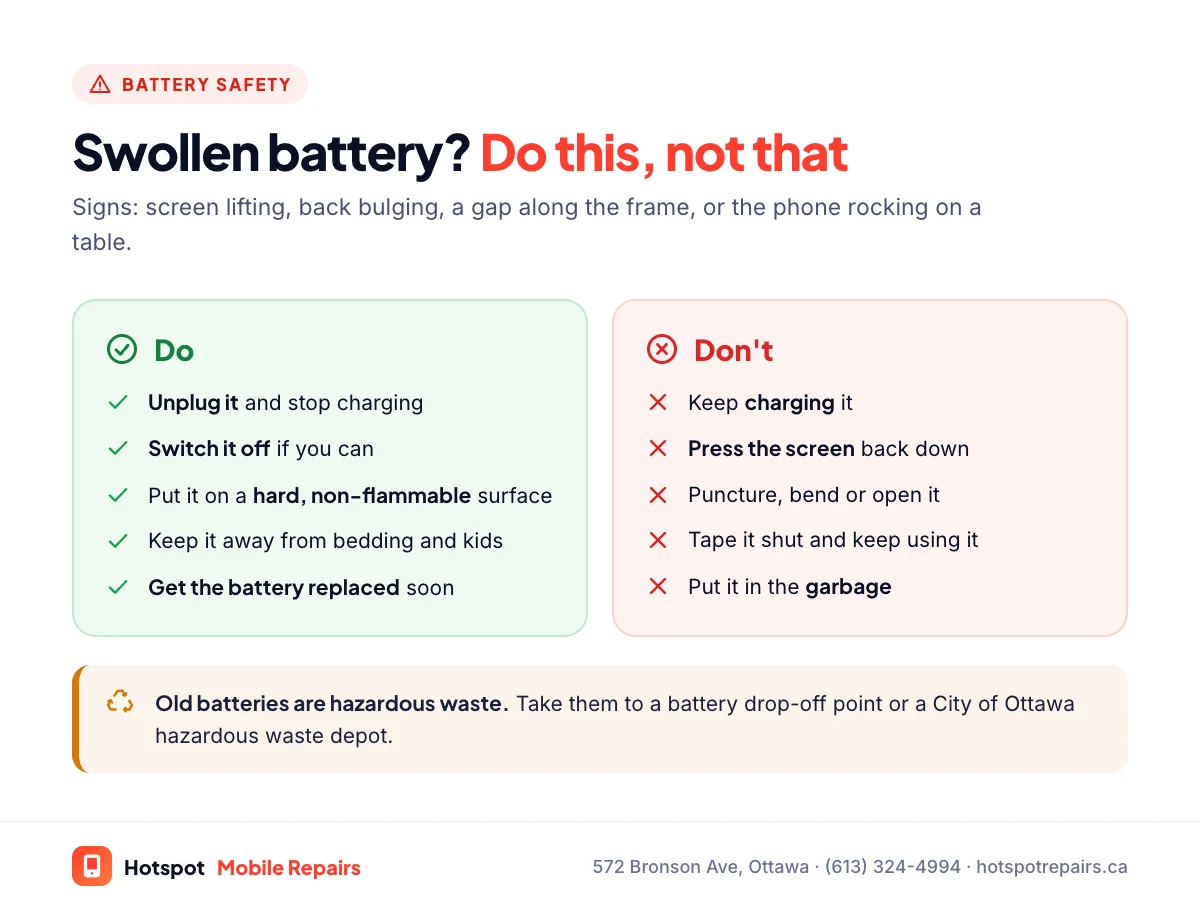
- Signs: screen lifting, back bulging or separating, a gap along the frame, the phone rocking on a table.
- Unplug it, switch it off if you can, and don't press, bend or puncture it.
- Swollen batteries can overheat or catch fire. Get the battery replaced promptly.
- Recycle old batteries at a drop-off point, never in household garbage.
Most phone problems can wait a few days. A swollen battery is the exception. It usually shows up as a screen that's starting to lift away from the frame, and it means the battery inside has started to break down. Here's what to look for and exactly what to do.
Signs your phone battery is swollen
- The screen is lifting or bulging at one edge, or there's a new gap between the screen and the frame.
- The back is bulging or separating from the phone.
- The phone rocks or spins when you lay it flat on a table.
- The screen shows pressure marks or stops responding properly to touch.
- The phone feels warm when it shouldn't, and the battery drains much faster than before.
Why batteries swell
As a lithium-ion battery ages, its chemistry slowly breaks down and can release gas, which puffs up the sealed pouch. Heat speeds this up, as do physical damage, faulty or uncertified chargers and, occasionally, manufacturing defects. Samsung's own battery care advice even says to "unplug the charger after the device has reached a 100% charge to avoid a swollen battery." Some models have known issues: Google runs an extended repair program for the Pixel 7a covering unexpected battery swelling. Our Pixel repair guide has the details.
What to do right now
- Unplug it and don't charge it again.
- Switch it off if you can.
- Don't press the screen back down, tape it shut, bend it or try to open it. Puncturing a swollen battery can start a fire.
- Put it somewhere safe: a hard, non-flammable surface like a tile floor or a metal tray, away from bedding, paper and children. Health Canada's advice to charge devices away from soft surfaces like a couch or bed applies doubly here.
- Need your photos? If it still turns on, you can back up over Wi-Fi without plugging it in, then switch it off. See our backup checklist.
- Get the battery replaced as soon as possible.
If it's hot, hissing or smoking: move away from it, keep others away, and call 911 if there's any fire. Don't try to put out a lithium battery fire with your hands.
Getting it fixed
A swollen battery is replaced the same way as a worn one, and usually takes about as long. If the swelling pushed the screen out and damaged it, the screen may need replacing too; we check before quoting. On iPhones, Apple's battery service costs $95 to $179 in Canada depending on the model, and our iPhone battery guide has the full list. If your phone is under warranty or covered by a manufacturer program, check that first.
Disposing of a swollen battery safely in Ottawa
Health Canada is blunt about it: "Batteries are considered hazardous waste. Do not place them in household garbage." Your options in Ottawa:
- Battery drop-off points listed by Recycle Your Batteries, Canada!, run by Call2Recycle, at many stores across the city.
- City of Ottawa household hazardous waste depots. Check the City's Waste Explorer for current dates and locations.
Until then, keep the battery or phone cool and away from anything flammable. For the whole phone, including where to recycle it, see our guide to recycling an old phone in Ottawa.
How to avoid it next time
- Keep your phone out of heat: no dashboards, no charging under pillows.
- Use the charger that came with your phone or a certified one. Health Canada recommends marks like CSA, cUL or cETL.
- Replace a worn battery before it gets old enough to swell; our cold-weather guide explains other battery habits worth keeping.
Frequently asked questions
Can I keep using my phone with a swollen battery?
You shouldn't. Health Canada advises against using batteries that are swollen or damaged. Stop charging it and get the battery replaced as soon as you can.
Can a swollen phone battery catch fire?
It can. Swelling means the battery's chemistry has broken down, and a damaged lithium-ion battery can overheat, smoke or catch fire, especially if it's punctured, crushed or charged. If it's hot, hissing or smoking, move away from it and call 911 if there's fire.
How much does it cost to replace a swollen battery?
The same as a normal battery replacement, unless the swelling also damaged the screen. Apple charges $95 to $179 for iPhone battery service in Canada; we quote by model.
Why did my phone battery swell?
Usually age and heat: over years of charging, the battery's chemistry breaks down and releases gas. Heat, damage, cheap chargers and manufacturing defects make it more likely. Google, for example, runs an extended repair program for unexpected battery swelling on the Pixel 7a.
How do I dispose of a swollen battery in Ottawa?
Never in the garbage or the recycling bin. Take it to a battery drop-off point, such as one listed by Recycle Your Batteries, Canada!, or a City of Ottawa household hazardous waste depot. Keep it in a cool place in a non-flammable container until then.
Sources & further reading
- Battery safety: Lithium-ion batteries — Health Canada
- Galaxy Battery – Care and Maintenance — Samsung
- Extended Repair Program for Pixel 7a — Google Pixel Help
- Recycle Your Batteries, Canada! — Call2Recycle Canada
Prices and details were checked on September 27, 2026. They can change; call us for today's price.