Why Your Phone Dies in the Cold (and How to Protect It in an Ottawa Winter)
Ottawa winters regularly fall far below the temperatures phones are designed for. Here's what the cold actually does to your battery, and eight habits that keep your phone alive until spring.

Quick answer
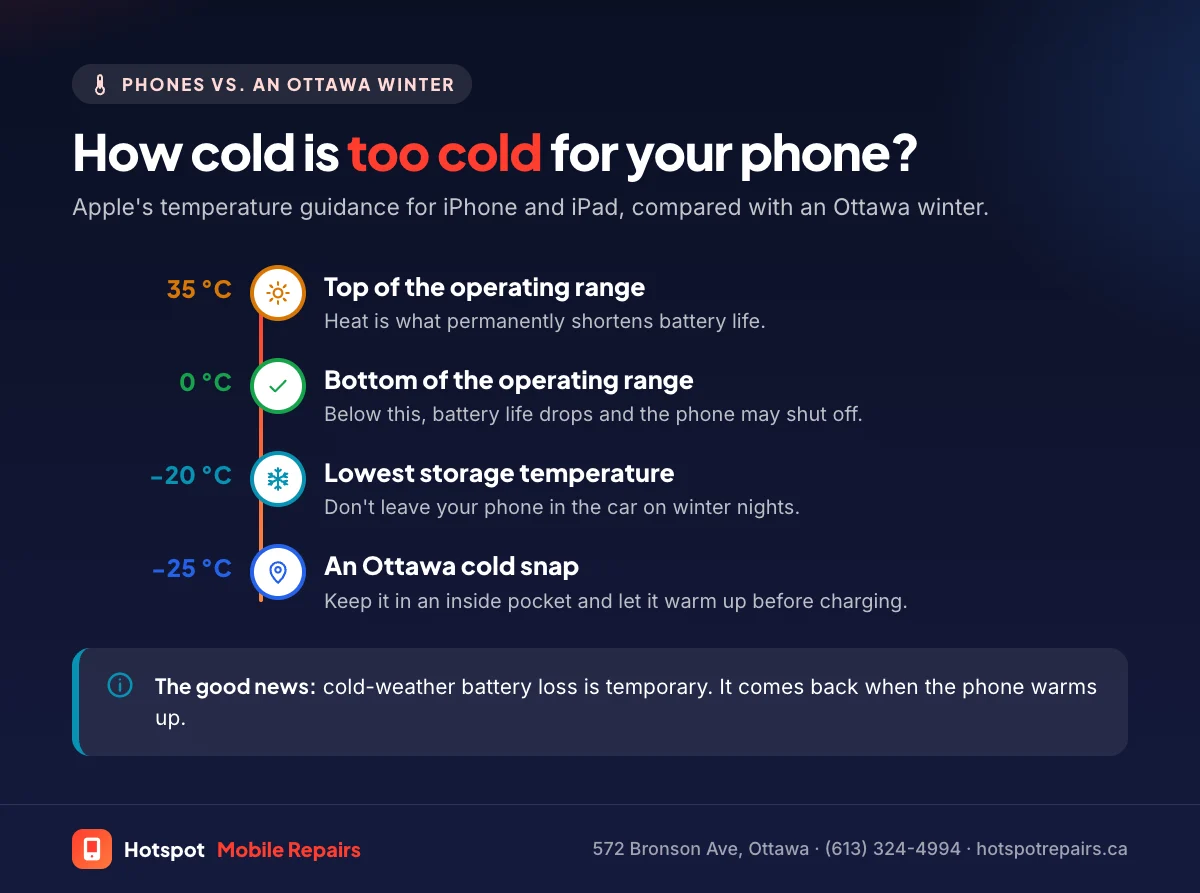
Cold slows the chemical reactions inside a lithium-ion battery, so it can't deliver as much power and the phone may shut down even with charge left. Apple designs iPhones to be used between 0 °C and 35 °C and says cold “might temporarily shorten battery life and could cause your device to turn off.” The effect is temporary: the battery recovers once it warms up. Worn batteries suffer most, so frequent winter shutdowns are a sign it may be time for a new one.
- Apple's operating range for iPhone and iPad is 0 °C to 35 °C. Ottawa winter days are often far colder.
- Cold-weather battery loss is temporary; damage from heat is permanent.
- A cold iPhone “might not charge or could stop charging,” Apple says. Let it warm up first.
- If your phone shuts down in the cold a lot, check its battery health.
Every winter, the same thing happens to thousands of phones in Ottawa: you step out at the bus stop, open your maps app, and the phone dies at 30%. It's not your imagination, and it's usually not a broken phone. Ottawa is one of the coldest capital cities in the world, and phone batteries were never designed for its winters.
Why the cold drains your battery
A lithium-ion battery makes power through chemical reactions. In the cold those reactions slow down, so the battery can't deliver current as easily. When the phone asks for a burst of power, for the camera, GPS or a weak cell signal, the voltage dips. If it dips far enough, the phone shuts itself off to protect its components, even though the battery still holds charge.
That's why a phone that died outside often comes back to life indoors, sometimes showing more battery than when it shut off.
What Apple says about temperature
Apple's temperature guidance is clear:
- iPhone and iPad are "designed for use where the ambient temperature is between 0° and 35° C."
- Store them between −20° and 45° C, and don't leave them in a car.
- Very cold conditions "might temporarily shorten battery life and could cause your device to turn off. Battery life will return to normal when you bring your device back to higher ambient temperatures."
- "If your iOS or iPadOS device gets too cold, it might not charge or could stop charging."
Android phones use the same battery chemistry, so the same rules apply.
Why some phones cope worse than others
A worn battery has less headroom, so it hits the shutdown point sooner. If your phone shuts off in the cold every day, or even in a cool room, the battery is probably past its best. Check Settings › Battery › Battery Health on an iPhone; below 80% means it's time. Our battery replacement guide explains the numbers.
8 ways to protect your phone this winter
- Carry it in an inside pocket. Your body heat is the best phone warmer there is.
- Use it less outside on bitter days. Check directions before you leave, and use earbuds or voice commands rather than taking the phone out.
- Leave home with a full charge, and keep a power bank in a warm pocket.
- Don't charge it while it's frozen. Let it warm to room temperature first; Apple says a cold phone might not charge.
- Don't speed up warming with heat. No radiators, hair dryers or car vents; heat is what permanently damages batteries.
- Let it warm gradually when you come in. Leave it in your pocket or bag for a few minutes so moisture doesn't condense on a very cold phone.
- Don't leave it in the car overnight. Ottawa nights can drop below Apple's −20 °C storage limit.
- Keep a case on. It won't keep the phone warm, but icy sidewalks are where a lot of our winter screen repairs start.
Snow, slush and road salt
Melting snow and salty slush are harder on phones than cold air. Salt water is corrosive, especially inside the charging port. If your phone gets wet, dry it off, don't charge it until the port is dry, and follow our water damage steps. If it stops charging after a slushy walk, see why your phone won't charge.
When to get it checked
Bring your phone in if it shuts down in the cold at 30% or more, dies indoors at normal temperatures, won't charge after warming up, or shows any sign of swelling (see our swollen battery guide). Battery checks at our shop at 572 Bronson Avenue are free, and most replacements take under an hour.
Frequently asked questions
Why does my phone die at 30% in the cold?
In the cold, a battery can't deliver power as easily, so its voltage dips when the phone asks for power. The phone shuts down to protect itself even though charge is left. It usually comes back once it warms up, often showing a higher percentage than before.
Can cold weather permanently damage my phone battery?
Apple says the effect of cold on battery life is temporary and returns to normal at higher temperatures. Heat is different: using a device in very hot conditions can permanently shorten battery life. Avoid charging a phone while it's very cold.
Is it safe to charge a phone that's been out in the cold?
Let it warm up to room temperature first. Apple says a device that gets too cold might not charge or could stop charging.
Does a phone case keep my phone warm?
A little, but your body heat does far more. Carry your phone in an inside pocket, and use the case mainly for drops on icy sidewalks.
Should I replace my battery before winter?
If Battery Health is below 80% or your phone already shuts down in cool weather, yes. A healthy battery copes with the cold much better than a worn one.
Sources & further reading
- If your iPhone or iPad gets too hot or too cold — Apple Support (Canada)
- iPhone battery and performance — Apple Support (Canada)
- Battery safety: Lithium-ion batteries — Health Canada
- If you see a liquid-detection alert on your iPhone — Apple Support (Canada)
Prices and details were checked on September 27, 2026. They can change; call us for today's price.