Phone Won't Charge? 7 Fixes to Try Before You Pay for a Repair
Most charging problems are cheap to solve. Work through these seven checks in order, and you'll either fix it yourself or know exactly what to ask a repair shop.

Quick answer
Start with the simple things: try a different cable and charger, restart the phone, and look into the charging port with a flashlight. Pocket lint packed into the port is one of the most common reasons a phone stops charging. If wireless charging works but the cable doesn't, the port is the likely culprit. Charging port repairs at Hotspot Mobile Repairs on Bronson Avenue start from $79, and sometimes a cleaning is all it needs.
- Rule out the cable and charger first. They fail far more often than phones do.
- Lint in the port stops the plug seating fully. Check with a flashlight.
- If wireless charging works but wired doesn't, it's probably the port.
- Heat, cold, liquid alerts and battery limits can pause charging on purpose.
A phone that won't charge feels like an emergency, but the fix is often free. We see plenty of "broken" phones at our Bronson Avenue shop that just needed a new cable or a clean port. Work through these steps in order.
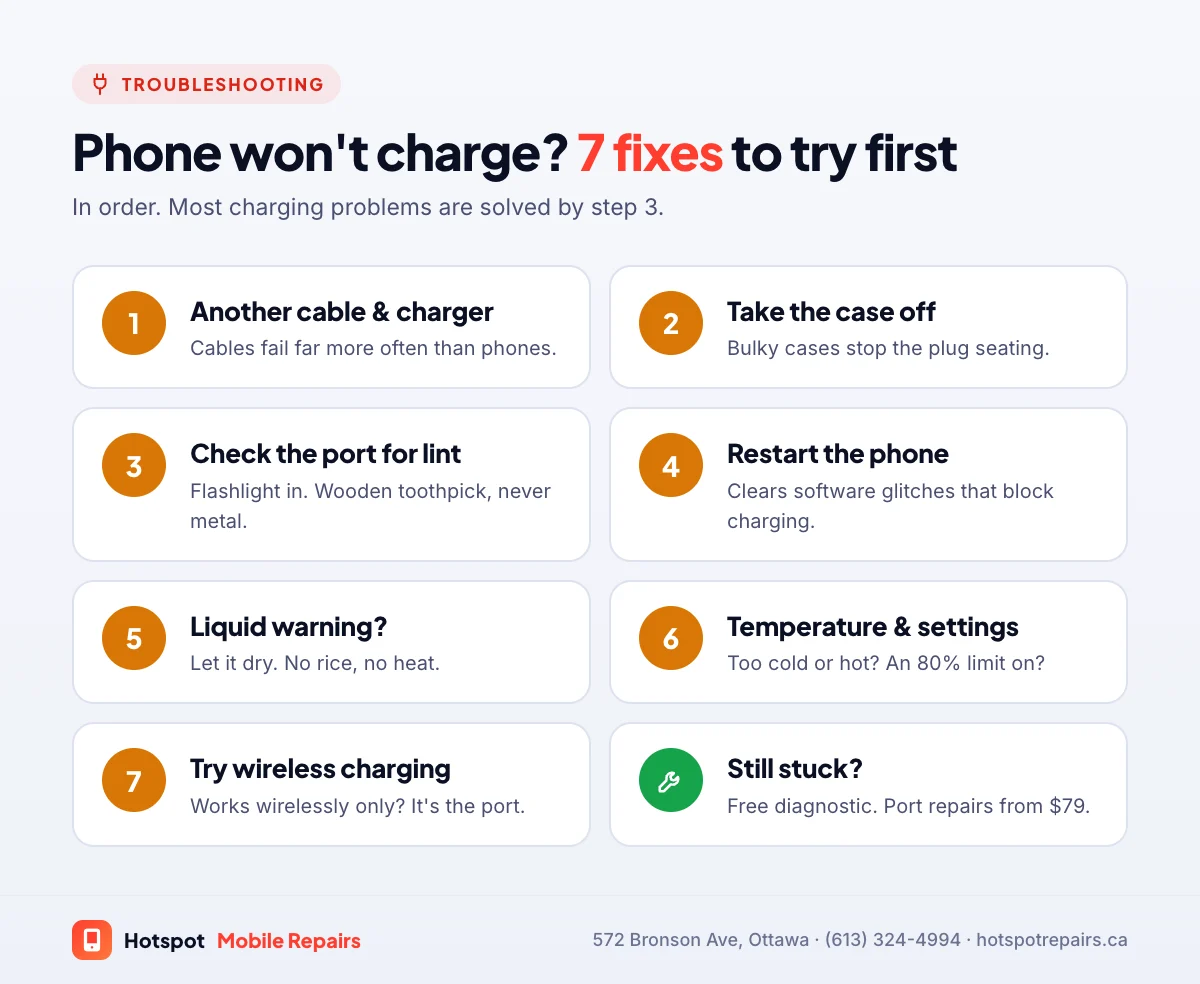
7 fixes to try, in order
1. Try a different cable and charger
Cables fray inside long before they look damaged, and cheap chargers fail. Test with a cable and adapter you know work, ideally on a different outlet. Google's own charging help suggests the same first step. When you replace a charger, Health Canada recommends one with a recognized certification mark such as CSA, cUL or cETL.
2. Take the case off
A thick or bulky case can stop the plug from going all the way in, especially with USB-C.
3. Look for lint in the port
Shine a flashlight into the charging port. Pocket lint gets packed in every time you plug in, until the plug can't reach the contacts. If you see a grey mat at the bottom, that's your problem.
Cleaning it yourself: switch the phone off, make sure it's completely dry, and gently lift the lint out with a wooden or plastic toothpick. Never use a pin, paper clip or anything metal; you can short or bend the contacts. If it's packed in hard, bring it in and we'll clean it properly.
4. Restart the phone
Software glitches can stop charging. A restart clears them. If the phone is frozen, force restart it: see our phone won't turn on guide for the button combinations.
5. Check for a liquid warning
iPhone XS, XR and later can warn you when there's liquid in the connector, and block charging to protect the phone. Apple says to tap it gently with the connector facing down, leave it somewhere dry with some airflow, and try again after at least 30 minutes; it can take up to 24 hours to dry. Don't put it in rice. If it got properly wet, follow our water damage steps.
6. Check the temperature and battery settings
Phones pause charging when they're too hot or too cold on purpose. Apple says a cold device "might not charge or could stop charging," so let it reach room temperature, which matters in an Ottawa winter; see our cold-weather guide. Also check your settings: Optimized Battery Charging, the 80% limit on newer iPhones and battery protection modes on Android hold the charge below 100% by design.
7. Try wireless charging
If your phone supports it, put it on a wireless charger. If wireless charging works but the cable doesn't, the problem is almost certainly the charging port. If neither works, it's more likely the battery or the board.
When it's time for a repair
Bring it in if the plug feels loose or wobbly, it only charges at an angle, it charges only when the phone is off, the port got wet or corroded, or you smell anything burnt. We micro-solder and replace Lightning and USB-C ports, and charging port repairs start from $79, usually done in under an hour.
Port, battery or board? Reading the symptoms
| What you notice | Most likely cause |
|---|---|
| Charges wirelessly but not with a cable | Charging port (lint or damage) |
| Only charges at an angle or with the cable held | Charging port |
| Charges, but the percentage drops fast | Worn battery |
| Stops charging at 80% | Battery-saving setting, or heat |
| Nothing works, not even wireless | Battery, charging chip or board |
If it's the battery, see our battery replacement guide. If the phone won't come on at all, start with our no-power checklist. Diagnostics are free at our shop.
Frequently asked questions
Why does my phone only charge at a certain angle?
The plug isn't making full contact. Usually the port is packed with lint, or its contacts are worn or damaged. A cleaning often fixes it; otherwise the port is replaced.
Can I clean my charging port myself?
Carefully: switch the phone off, make sure it's dry, and gently lift lint out with a wooden or plastic toothpick. Never use metal, and never poke at a wet port. If the lint is packed in hard, let us do it.
How much does a charging port repair cost in Ottawa?
At Hotspot Mobile Repairs, charging port repairs start from $79. If the port only needs cleaning, it costs less.
Why does my iPhone stop charging at 80%?
That's usually on purpose. Optimized Battery Charging, or the 80% limit on newer models, holds the charge to reduce battery wear. It can also pause when the phone is too warm.
My iPhone says liquid was detected. What should I do?
Unplug it and let it dry. Apple says to tap the phone gently with the connector facing down, leave it somewhere dry with some airflow, and try charging again after at least 30 minutes; it can take up to 24 hours to dry fully.
Sources & further reading
- If you see a liquid-detection alert on your iPhone — Apple Support (Canada)
- If your iPhone or iPad gets too hot or too cold — Apple Support (Canada)
- Fix a Pixel phone that won't charge or turn on — Google Pixel Help
- Battery safety: Lithium-ion batteries — Health Canada
Prices and details were checked on September 27, 2026. They can change; call us for today's price.