“Unknown Part” on Your iPhone? What Parts and Service History Means
Your iPhone keeps a record of replaced parts. Here's how to read it, what the Genuine, Used and Unknown labels mean, and whether you need to worry.

Quick answer
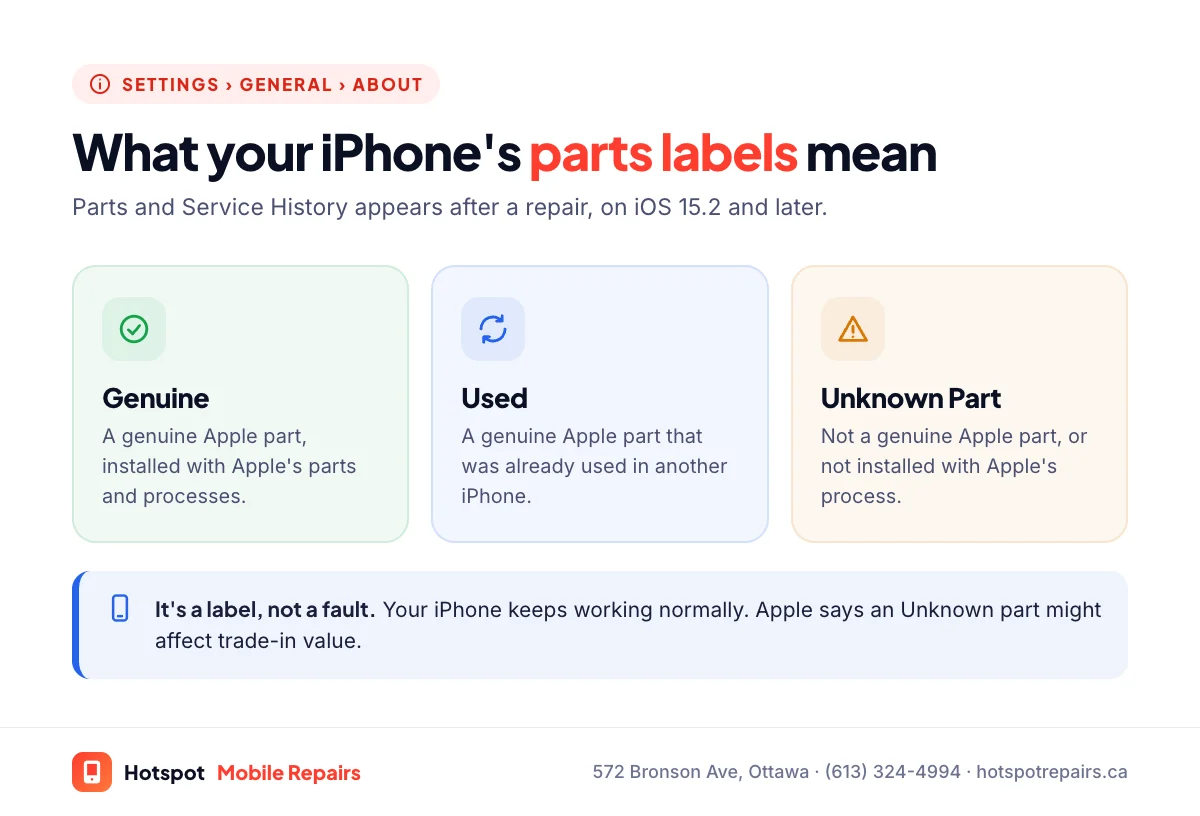
“Unknown Part” means your iPhone found a replacement part that isn't a genuine Apple part, or wasn't installed with Apple's calibration process. It's a label, not a fault: the phone keeps working. You'll see a notification after the repair, and Apple says an Unknown part “might affect the trade-in value.” Parts installed through Apple's process show as Genuine, or Used if they came from another iPhone.
- Find it in Settings › General › About (iOS 15.2 and later).
- Genuine: genuine Apple part and process. Used: a genuine part previously in another iPhone. Unknown: not genuine, or not calibrated with Apple's process.
- The notification appears the first time you unlock after the repair and again five days later.
- An Unknown Part label may lower trade-in value, but it doesn't stop the phone working.
You got your iPhone screen or battery replaced, unlocked your phone, and saw a message about an "Unknown Part". It's a common worry at our shop, and in most cases it's nothing to be alarmed about. Here's what the message means and what, if anything, it changes.
Where to find Parts and Service History
On iOS 15.2 and later, open Settings › General › About. If any parts have been replaced, you'll see a Parts and Service History section listing them. If you've never had a repair, the section doesn't appear. Apple explains the feature on its Parts and Service History page.
What each label means
| Label | What Apple says it means |
|---|---|
| Genuine | The repair was done using genuine Apple parts and processes. |
| Used | A genuine Apple part that was already used or installed in another iPhone. |
| Unknown Part | The part isn't a genuine Apple part, or it wasn't installed with Apple's process. |
| Unverified | Appears if the logic board was previously used in another iPhone. |
Genuine Apple parts, Apple explains, are individually calibrated with data stored on Apple's servers when they're made, and that data is retrieved to finish the repair. That's why a part can only show as Genuine or Used when it goes through Apple's process.
Does "Unknown Part" mean the repair is bad?
No. It tells you where the part came from, not how good it is. A high-quality soft OLED screen and a cheap LCD both show as "Unknown Part", even though they look very different. Our guide to OLED vs. LCD replacement screens explains how to judge the part itself.
What does it actually affect?
- A notification. Apple says you'll see it the first time you unlock after the repair and again five days later.
- Trade-in value. Apple says an Unknown part "might affect the trade-in value of your device." Buyers can see the history too.
- Battery details. With a non-genuine battery, iOS may not show battery health information the way it does for a genuine one.
What it doesn't do: stop your iPhone from working, block calls or apps, or erase anything.
How to get "Genuine" instead
Genuine parts installed through Apple's process are available from Apple, Apple Authorized Service Providers and Independent Repair Providers, and Apple's Canadian site also has a Self Service Repair page for experienced DIYers. They usually cost more; compare Apple's prices in our iPhone screen repair cost guide. Whether it's worth paying extra mostly depends on whether you'll sell or trade the phone soon, which we cover in repair or replace?
Buying a used iPhone? Check this first
Before you pay for a used iPhone, open Settings › General › About and look for Parts and Service History. It tells you what's been replaced. Also confirm that Activation Lock is off; if the seller's Apple ID is still attached, you won't be able to set the phone up.
Our approach at Hotspot
Before any iPhone repair, we tell you which part we're quoting and how it will appear in Settings, so there are no surprises. Every parts replacement comes with our 100-day warranty. If you're weighing Apple against a local shop, read our side-by-side comparison, and if it's your battery that was replaced, see how iPhone battery health works.
Frequently asked questions
Is it safe to use an iPhone that says Unknown Part?
Yes. The label is informational. Your iPhone works normally; how well the replacement part performs depends on its quality and on how it was installed.
Can I remove the Unknown Part message?
Not with a setting. The entry stays in Parts and Service History. Replacing the part again with a genuine Apple part installed through Apple's process would show it as Genuine.
How often will my iPhone show the notification?
Apple says the notification appears the first time you unlock the iPhone after the repair and again five days later. After that, the information stays in Settings.
Does Unknown Part affect my warranty?
The replacement part is covered by the warranty of the shop that installed it. Apple says repairs by independent providers aren't covered by Apple's warranty or AppleCare plans.
Should I check this before buying a used iPhone?
Yes. It shows which parts have been replaced. Also make sure Activation Lock is off, or you won't be able to set the phone up.
Sources & further reading
- iPhone Parts and Service History — Apple Support (Canada)
- Independent Repair Provider Program — Apple Support
- Self Service Repair — Apple Support (Canada)
- Activation Lock for iPhone and iPad — Apple Support (Canada)
Prices and details were checked on September 27, 2026. They can change; call us for today's price.