OLED vs. LCD Replacement Screens for iPhone: What's the Difference?
Not all replacement screens are equal. Here's what separates a genuine screen from a soft OLED, a hard OLED and a budget LCD, and which one makes sense for your iPhone.

Quick answer
Most iPhones since the iPhone X came with OLED screens, and the best replacement is another OLED: a genuine Apple screen or a quality “soft” OLED looks and works like the original. Budget “incell” LCD replacements cost less but are thicker, less bright, show greyer blacks and use more battery. The iPhone XR, iPhone 11 and iPhone SE came with LCD screens, so an LCD replacement is the right match for those.
- OLED originals: iPhone X, XS, 11 Pro and every iPhone 12 or newer. LCD originals: iPhone XR, 11, SE and the iPhone 8 and older.
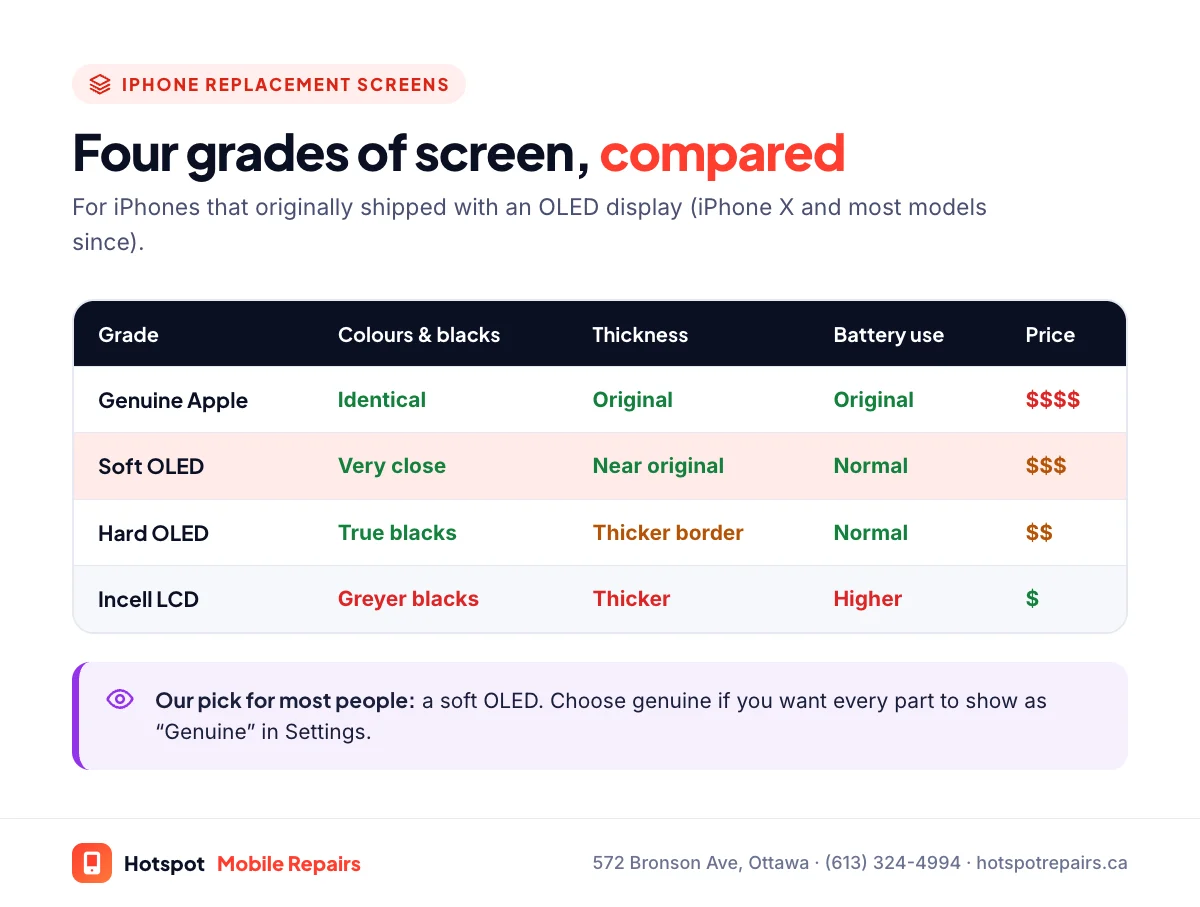
- Replacement grades from best to cheapest: genuine Apple, soft OLED, hard OLED, incell LCD.
- An LCD on an OLED iPhone saves money but looks worse and drains the battery faster.
- Non-genuine screens appear as “Unknown Part” in Settings; the phone keeps working.
When you get quotes for an iPhone screen, you'll often see very different prices for "the same" repair. Usually the difference is the part. Replacement screens come in several grades, and the cheapest ones use completely different display technology from what your iPhone shipped with. Here's what you need to know to compare quotes fairly.
Which iPhones use OLED, and which use LCD?
| Original display | iPhone models |
|---|---|
| OLED | iPhone X, XS, XS Max, 11 Pro, 11 Pro Max, and every iPhone 12 or newer |
| LCD | iPhone XR, iPhone 11, iPhone SE (2nd and 3rd generation), iPhone 8 and older |
Not sure which model you have? Apple's model identification page will tell you. If your iPhone originally had an LCD, an LCD replacement is a like-for-like repair and there's nothing to worry about. The rest of this guide is about the OLED models.
The four grades of replacement screen
Genuine Apple
Identical to the original, and the most expensive. When installed through Apple's own processes it shows as "Genuine" in Settings.
Soft OLED
A flexible OLED panel, built like the original. Colours, contrast, brightness and border thickness are very close to genuine. For most people this is the best value on an OLED iPhone.
Hard OLED
A rigid OLED panel. You still get true OLED blacks, but the panel is thicker, the black border around the image is a little wider, and it costs less than a soft OLED.
Incell LCD
The budget option: an LCD built to fit an OLED iPhone. It's the cheapest, but it's thicker, less bright, shows grey rather than black in dark scenes, and uses more battery because its backlight is always on. Touch response can also feel different.
Things to ask about before the repair
- True Tone. True Tone relies on data stored with the original screen. On many models a technician can copy it to the new screen. Ask whether it will work on yours.
- 120 Hz ProMotion. Pro models since the iPhone 13 Pro, and newer models like the iPhone 17 and iPhone Air, refresh the screen at up to 120 Hz. If you have one, ask whether the replacement supports it.
- Face ID. Face ID lives in the TrueDepth camera, not the display panel, so a careful repair keeps it working with any grade of screen.
What about the "Unknown Part" message?
Since iOS 15.2, your iPhone lists replacement parts under Settings › General › About › Parts and Service History. Any screen that isn't a genuine Apple part installed with Apple's process shows as "Unknown Part", including high-quality soft OLEDs. It's a label, not a fault. We cover what it affects in What "Unknown Part" means on your iPhone.
How to tell what you actually got
- Open a completely black image in a dark room. OLED stays black; LCD glows grey.
- Look at the border around the display. Thicker borders suggest a hard OLED or LCD.
- Check Parts and Service History in Settings.
- Watch your battery over a few days. An LCD on an OLED iPhone usually drains noticeably faster.
What we recommend
If your iPhone came with OLED, get an OLED replacement: soft OLED for the best value, or genuine if you want every part to show as Genuine. An LCD only makes sense when the budget is tight or the phone is near the end of its life, which our guide on repairing vs. replacing can help you judge. Whatever you choose, ask the shop which grade it's quoting; it's question two on our repair shop checklist. For prices by model, see our iPhone screen repair cost guide.
Frequently asked questions
Is an OLED replacement screen as good as the original?
A genuine Apple screen is identical to the original. A quality soft OLED comes very close in colour, brightness and thickness. Hard OLEDs and LCDs are noticeably different.
Why is an LCD replacement screen cheaper?
LCD panels cost much less to make than OLED panels. The trade-off on an iPhone that shipped with OLED is a thicker screen, greyer blacks, lower contrast and higher battery use.
Will a non-genuine screen affect Face ID?
Face ID lives in the TrueDepth camera at the top of the phone, not in the display panel, so a careful repair keeps it working whatever grade of screen you choose.
Can I keep True Tone after a screen replacement?
On many models, yes. True Tone relies on data stored with the original screen, which a technician can often copy to the new one. Ask before the repair so you know what to expect for your model.
Which screens does Hotspot use?
We offer more than one grade for popular models, tell you exactly which one we're quoting, and recommend an OLED for any iPhone that originally had one.
Sources & further reading
- Identify your iPhone model — Apple Support (Canada)
- iPhone Parts and Service History — Apple Support (Canada)
- Apple Service and Repair for iPhone Screens — Apple Support (Canada)
- iFixit: The Free Repair Manual — iFixit
Prices and details were checked on September 27, 2026. They can change; call us for today's price.