How to Choose a Phone Repair Shop in Ottawa: 10 Questions to Ask First
Price, parts, warranty, privacy and timing: the ten questions that separate a good repair shop from a risky one, and the red flags to walk away from.

Quick answer
Choose a shop that confirms the price, the part grade and the warranty before it starts, doesn't need to erase your phone or know your account passwords for a screen or battery repair, tests the phone with you before and after, and has recent reviews you can read. In Ottawa, Hotspot Mobile Repairs on Bronson Avenue offers free diagnostics, a 100-day parts warranty and most repairs in 30 to 60 minutes.
- Get the price, part grade and warranty confirmed before the repair starts.
- A good shop tests your phone with you before and after the repair.
- Never hand over your Apple ID or Google password for a screen or battery repair.
- Read recent Google reviews, not just the star rating.
Ottawa has dozens of places that will fix a phone, from mall kiosks to Apple's own stores. Most do honest work; a few don't. You don't need to know anything about electronics to tell them apart. You just need to ask the right questions before you hand over the phone that holds your photos, banking apps and two-factor codes.
The 10 questions
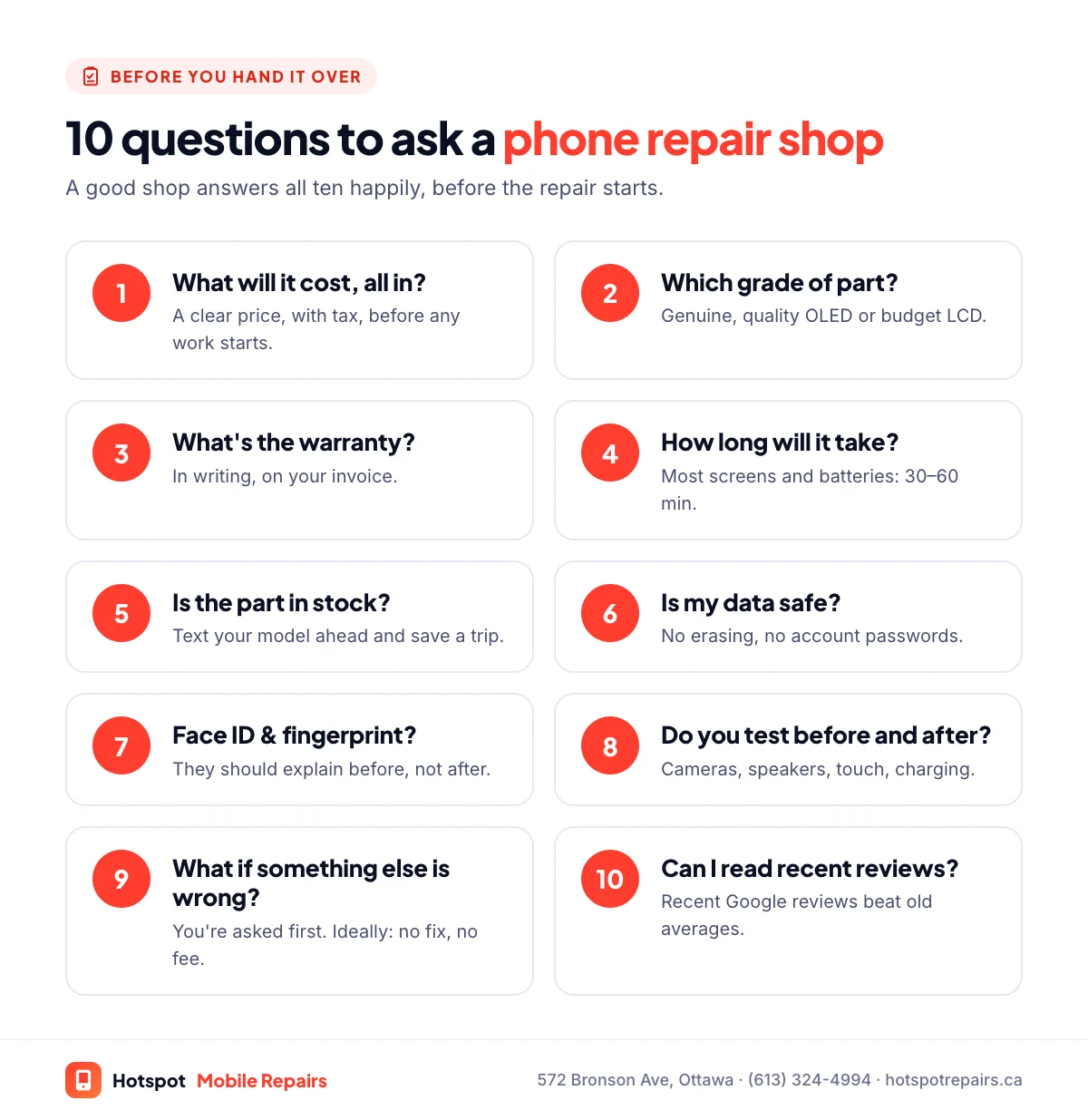
1. What will it cost, all in?
You should get a clear price, including tax, before any work starts. If the shop finds something else wrong once the phone is open, it should call you before doing extra work. Free quotes and diagnostics are normal.
2. What grade of part will you use?
Two quotes for "an iPhone 15 screen" can be for very different parts: a genuine screen, a high-quality OLED, or a budget LCD. Ask which one you're getting. Our guide to OLED vs. LCD replacement screens explains the differences.
3. How long is the warranty, and what does it cover?
Look for a warranty on the part, in writing. It normally covers defects, not new accidental damage. Ours is 100 days on every parts replacement; keep your invoice as proof.
4. How long will it take?
Most screens and batteries take 30 to 60 minutes. Some Face ID and in-screen fingerprint models take one to two hours so every sensor keeps working. If a shop wants to keep your phone for days for a simple screen, ask why. See what can usually be fixed the same day.
5. Is the part in stock?
A quick text with your model saves a wasted trip. Telling the shop ahead of time also lets it set the part aside for you.
6. Will my data be safe?
Screen, battery, charging port and camera repairs don't erase your phone. You shouldn't need to share your Apple ID or Google password, and for most repairs you can unlock the phone yourself to test it. Back up before any repair anyway.
7. Will Face ID, True Tone or my fingerprint reader still work?
A careful repair keeps them working, but it depends on the model and the part. On Samsung phones with an in-screen fingerprint reader, for example, budget LCD-type screens stop the reader working; see our Samsung screen guide. A good shop explains this before the repair, not after.
8. Do you test the phone before and after?
The technician should check cameras, speakers, microphones, touch, charging and buttons, ideally with you. Problems that existed before the repair should be noted on the ticket.
9. What happens if you find something else wrong?
You should be told first and given the choice. For water damage and phones that won't turn on, look for "no fix, no fee": you only pay if the repair works.
10. Can I read your recent reviews?
Look at recent Google reviews, not just the average. Do people mention honest prices, repairs that lasted, and being told the truth when something wasn't worth fixing?
Red flags to walk away from
- No price until the phone is already open.
- No written warranty, or no invoice.
- They ask for your Apple ID or Google password.
- They insist on erasing the phone for a simple screen or battery repair.
- They won't tell you which grade of part they're using.
Authorized, independent, or Apple itself?
Apple Authorized Service Providers and Apple's Independent Repair Providers have access to genuine Apple parts and processes. Independent shops like ours can usually offer faster turnaround, lower prices and more than one grade of part. Whichever you choose, the ten questions above still apply. For iPhones specifically, compare your options in Apple Store vs. independent repair in Ottawa, and check what Apple itself charges in our iPhone screen repair cost guide.
How we answer these questions at Hotspot
We confirm your price before we start, tell you which grade of part you're getting, test the phone with you, and put our 100-day warranty on your invoice. Diagnostics are free, and water damage is no fix, no fee. We're at 572 Bronson Avenue, Unit B, between Centretown and the Glebe, rated 4.7 stars on Google.
Frequently asked questions
What should a phone repair warranty cover?
At minimum, the part that was replaced, against defects, for a stated period, in writing on your invoice. Accidental damage after the repair is normally excluded. At Hotspot, every parts replacement has a 100-day warranty against manufacturer defects.
Should I give a repair shop my passcode?
For most screen and battery repairs you don't need to. You can unlock the phone yourself to test it before and after. Never share your Apple ID or Google account password with anyone.
Is an Apple-authorized repair better than an independent one?
Authorized providers use genuine Apple parts and processes, which matters if you want every part to show as Genuine. Independent shops are usually faster and cheaper and can offer more than one grade of part. Both can do excellent work; the questions in this guide help you judge either.
How can I tell if a shop uses good parts?
Ask which grade you're getting before you pay. After the repair, compare brightness and colours, check touch response across the whole screen, and on an iPhone look at Settings › General › About › Parts and Service History.
Does Hotspot charge for a quote?
No. Quotes and diagnostics are free, and we confirm the price before we open your phone.
Sources & further reading
- Independent Repair Provider Program — Apple Support
- iPhone Parts and Service History — Apple Support (Canada)
- How to back up your iPhone, iPad, and iPod touch — Apple Support (Canada)
- Back up or restore data on your Android device — Android Help
Prices and details were checked on September 27, 2026. They can change; call us for today's price.